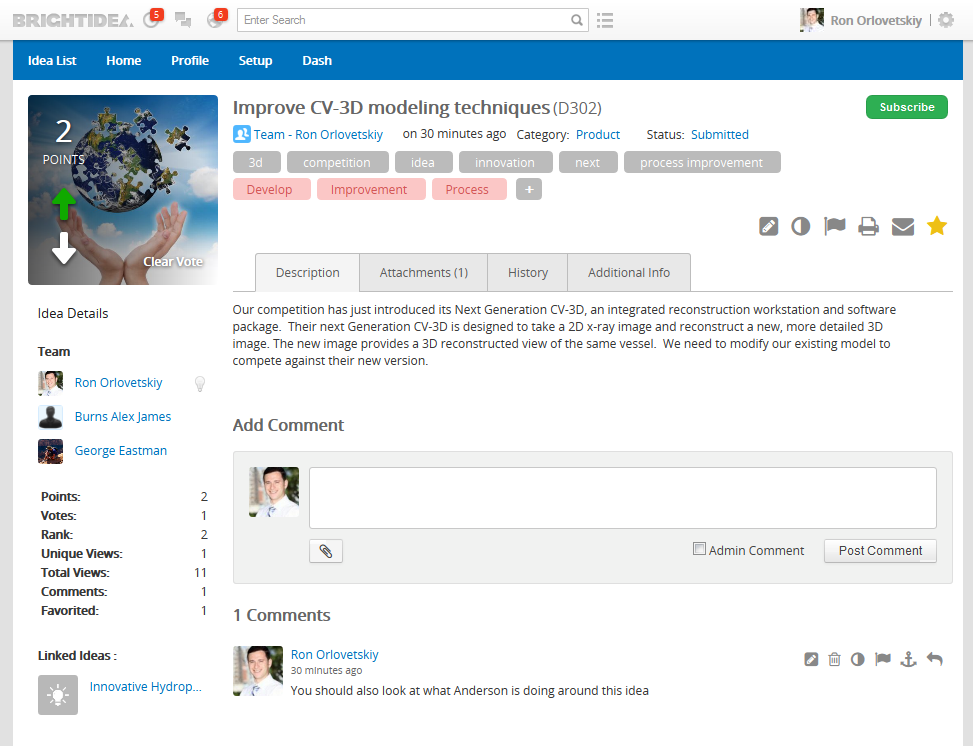
The View Idea 2.0 page utilizes a modern and streamlined design to display all submissions that will provide a better user experience for both administrators & end users.
Features
The View Idea 2.0 page provides all of the functionality from the existing View Idea page plus the additional features below:
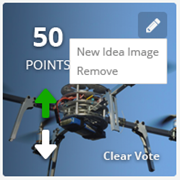
Select the 'pencil' icon next to any field in order to make the appropriate changes to the respective Submission Image
Full In-Line editing support for all submission fields - no need to navigate to the edit submission page to make any make changes (e.g. changing category, submitter etc...)
Submission / category subscription
Admins can subscribe/unsubscribe end users to submissions with the option enabled.
Tag entry & subscription
View Idea 2.0 Toolbar:
These new icons will show up on the far right of the new Idea page.
Edit Submission
Toggle Visibility
Report Abuse
Print View
Share Submission via Email
Favorite Submission
Idea Tabs
There are multiple tabs that separate information versus being all one unified page.
Description / Comments / Video Embedding
Attachments
History
Currently only shows who promoted or demoted the submission
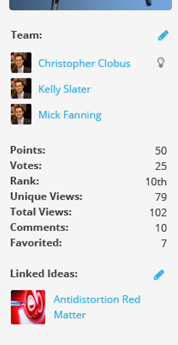
This widget is to provide additional submission metrics and statistics around the submission the user is landed on:
The widget will display the following items from the selected submission:
If Chips voting is enabled, “points” item will be hidden
A 'vote' is either promote, demote or user who’s added at least 1 chip.
Team: Full list of team members if a team posted the submission
Points: Total points after adding in the multiplying factor (seen in setup).
Number of Votes: Unique users who have voted on the submission (promotes and demotes)
Submission Rank: Rank is the what place the submission is in from highest point (or chip) to lowest point (or chip).
Unique Views: Unique number of views from both users registered in private Brightidea systems and 'non-users' from Brightidea public systems
Total Views: Total number of views regardless of who has viewed the submission
Total Comments: Total number of comments that includes both comment replies & admin comments.
Favorited: Total number of users who have Favorited the Submission.
Linked Submissions: Link to any submission(s) that have been linked to this submission.
Drag and drop support for Idea attachments
This new feature allows the submitter(s) to quickly drag and drop attachments for their submission:
View Idea Page "Back" button
This new selection takes the user back to the Submission Boards / submission list page:
Important things to Note:
Only the left column on the new View Idea page support widgets.
All widgets will automatically be placed into the new column.
Existing labels translations will be transferred to the new view submission page.
Additional labels can be translated with label edit mode and label tab in site setup area.
Comments
Sean Tori - Program Admin
Are the red tags at the top admin tags? How do we add them while viewing the idea? I can only see the ability to add regular tags while viewing the idea.
Brightidea Support
Hi Sean,
Good question, you can add admin tags by typing "!" symbol in front of it.
Thanks,
Ron
Ganesh
Are you able to modify the Views 2.0 CSS for a webstorm? For example, I'd like to hide the "Share Idea via Email" button. I was told this could be done through CSS and looking for instructions / tips on how one would make that change.
Brightidea Support
Hi Ganesh,
You'll need to inspect the element on the page with an inspector tool like Firebug to see if CSS can be applied to its ID. If possible, you'd apply the 'display: none;' CSS parameter to it.
This is usually done by the CSS coding resource on your end or through our Professional Services team.
Please let me know if there is anything else.
Thank you,
Brightidea Support
Ganesh
Is it possible to add additional tabs on this page? The intent is to pull in information from other systems and show them in the new tabs.
Thanks,
Ganesh
Pam Becker
HI there,
Are we able to add in additional tabs on this page. Keen to hear your response as per Ganesh's question above?
Thank you.
Pam.
Walling Almonte
Questions around "Submission Details" widget
1. We do not see the Points field although we do not use Chips voting. Is there a problem there?
2. Since we do not see a Points field, does "Rank" refer to 1) the place the submission is in among all submissions and 2) the Votes or Vote Score value.
3. The fields in the description don't always map 1:1 to the field in the screen shot. This causes minor confusion.
Please update this KBA as needed to clarify these issues in the guidelines.


Are the red tags at the top admin tags? How do we add them while viewing the idea? I can only see the ability to add regular tags while viewing the idea.
Hi Sean,
Good question, you can add admin tags by typing "!" symbol in front of it.
Thanks,
Ron
Are you able to modify the Views 2.0 CSS for a webstorm? For example, I'd like to hide the "Share Idea via Email" button. I was told this could be done through CSS and looking for instructions / tips on how one would make that change.
Hi Ganesh,
You'll need to inspect the element on the page with an inspector tool like Firebug to see if CSS can be applied to its ID. If possible, you'd apply the 'display: none;' CSS parameter to it.
This is usually done by the CSS coding resource on your end or through our Professional Services team.
Please let me know if there is anything else.
Thank you,
Brightidea Support
Is it possible to add additional tabs on this page? The intent is to pull in information from other systems and show them in the new tabs.
Thanks,
Ganesh
HI there,
Are we able to add in additional tabs on this page. Keen to hear your response as per Ganesh's question above?
Thank you.
Pam.
Questions around "Submission Details" widget
1. We do not see the Points field although we do not use Chips voting. Is there a problem there?
2. Since we do not see a Points field, does "Rank" refer to 1) the place the submission is in among all submissions and 2) the Votes or Vote Score value.
3. The fields in the description don't always map 1:1 to the field in the screen shot. This causes minor confusion.
Please update this KBA as needed to clarify these issues in the guidelines.